Use of hashcode() and equals()


Use of hashCode() and equals(). 

Object class provides two methods hashcode() and equals() to represent the identity of an object. It is a common convention that if one method is overridden then other should also be implemented.

Before explaining why, let see what the contract these two methods hold. As per the Java API documentation:

  • Whenever it is invoked on the same object more than once during an execution of a Java application, the hashcode() method must consistently return the same integer, provided no information used in equals() comparisons on the object is modified. This integer need not remain consistent from one execution of an application to another execution of the same application.
  • If two objects are equal according to the equals(object) method, then calling the hashCode() method on each of the two objects must produce the same integer result.
  • It is NOT required that if two objects are unequal according to the equals(Java.lang.Object) method, then calling the hashCode() method on each of the two objects must produce distinct integer results. However, the programmer should be aware that producing distinct integer results for unequal objects may improve the performance of hashtables.

Now, consider an example where the key used to store the in Hashmap is an Integer. Consider that Integer class doesn’t implement hashcode() method. Just for this example The code would look like:

  map.put(new Integer(5),”Value1″);
String value = (String) map.get(new Integer(5));
System.out.println(value);
//Output : Value is null

Null value will be displayed since the hashcode() method returns a different hash value for the Integer object created at line 2and JVM tries to search for the object at different location.

Now if the integer class has hashcode() method like:

public int hashCode(){
return value;
}

Everytime the new Integer object is created with same integer value passed; the Integer object will return the same hash value. Once the same hash value is returned, JVM will go to the same memory address every time and if in case there are more than one objects present for the same hash value it will use equals() method to identify the correct object.

Another step of caution that needs to be taken is that while implementing the hashcode() method the fields that are present in the hashcode() should not be the one which could change the state of object.

Consider the example:

publicclass FourWheeler implements Vehicle {


      private String name;

      privateintpurchaseValue;

      privateintnoOfTyres;

      public FourWheeler(){}


public FourWheeler(String name, int purchaseValue) {

            this.name = name;

            this.purchaseValue = purchaseValue;

      }

      publicvoid setPurchaseValue(int purchaseValue) {

            this.purchaseValue = purchaseValue;

      }


      @Override

      publicint hashCode() {

            finalint prime = 31;

            int result = 1;

            result = prime * result + ((name == null) ? 0 : name.hashCode());

            result = prime * result + purchaseValue;

            return result;

      }

}

FourWheeler fourWObj = new FourWheeler(“Santro”,”333333);
map.put(fourWObj,”Hyundai);
fourWObj.setPurchaseValue(“555555)
System.out.println(map.get(fourWObj));
//Output: null

We can see that inspite of passing the same object the value returned is null. This is because the hashcode() returned on evaluation will be different since the purchaseValue is set to ‘555555’ from ‘333333’. Hence we can conclude that the hashcode() should contain fields that doesn’t change the state of object.

One compatible, but not all that useful, way to define hashCode() is like this:

public int hashcode(){
return 0;
}

This approach will yield bad performance for the HashMap. The conclusion which can be made is that the hashcode() should(not must) return the same value if the objects are equal. If the objects are not equal then it must return different value.

Overriding equals() method

Consider the example:

publicclass StringHelper {


      private String inputString;


      public StringHelper(String string) {

            inputString=string;

      }


      @Override

      publicint hashCode() {

            returninputString.length();

      }


      publicstaticvoid main(String[] args) {


            StringHelper helperObj = new StringHelper(“string”);

            StringHelper helperObj1 = new StringHelper(“string”);

            if(helperObj.hashCode() == helperObj1.hashCode()){

                  System.out.println(“HashCode are equal”);

            }

            if(helperObj.equals(helperObj1)){

                  System.out.println(“Objects are equal”);

            }else{

                  System.out.println(“Objects are not equal”);

            }


      }


      public String getInputString() {

            returninputString;

      }


// Output:
HashCode are equal
Objects are not equal

We can see that even though the StringHelper object contains the same value the equals method has returned false but the hashcode method has return true value.

To prevent this inconsistency, we should make sure that we override both methods such that the contract between both methods doesn’t fail.

Steps that need to be taken into consideration while implementing equals method.

1. Use the == operator to check if the argument is a reference to this object.                                                                If so, return true. This is just a performance optimization, but one that is worth doing if the comparison is potentially expensive.

2. Use the instanceof operator to check if the argument has the correct type.

If not, return false. Typically, the correct type is the class in which the method occurs. Occasionally, it is some interface implemented by this class. Use an interface if the class implements an interface that refines the equals contract to permit comparisons across classes that implement the interface. Collection interfaces such as Set, List, Map, and Map.Entry have this property.

3. Cast the argument to the correct type. Because this cast was preceded by an instanceof test, it is guaranteed to succeed.

4. For each “significant” field in the class, checks if that field of the argument matches the corresponding field of this object.          If all these tests succeed, return true; otherwise, return false

5. When you are finished writing your equals method, ask yourself three questions: Is it symmetric? Is it transitive? Is it consistent?

The correct implementation if equals method for the StringHelper class could be:

@Override

      publicboolean equals(Object obj) {

            if (this == obj)

                  returntrue;

            if (obj == null)

                  returnfalse;

            if (getClass() != obj.getClass())

                  returnfalse;

            final StringHelper other = (StringHelper) obj;

            if (inputString == null) {

                  if (other.inputString != null)

                        returnfalse;

            } elseif (!inputString.equals(other.inputString))

                  returnfalse;

            returntrue;

      }


Google’s GDrive


The GDrive service will provide anyone (who trusts Google with their data) a universally accessible network share that spans across computers, operating systems and even devices.  Users will no longer require third party applications to emulate this behaviour by abusing Gmail storage.

In a Windows environment, most users know how to use the typical C: in “My Computer”.  Network drives work exactly the same but are given a different letter and the files within are not stored on the computer.  If my suspicions are correct and GDrive is simply a network share, most applications could take advantage of this service without modification.

The question of course is how Google will monetize a service like this.  I cannot see how file storage using a network share could be used to serve up advertisements — so maybe they won’t.  In some screenshots of Gmail for domains, it appears there are different “account plans” that I assume provide additional email addresses.  Could a similar system work for online storage?  For example, 1GB free and pay $5 for each additional.

Another way to generate income from this service would be to provide users a DVD backup of their data for a small monthly fee.  Depending on how often a GDrive is used by someone, it could make sense to receive a backup on a regular schedule — while they are at it, why not include some “cool” extras on those DVD’s?

Online storage with GDrive could be an important part of Google’s future plans — universal access to your data will soon become reality. Watch out and wait.

Program to check rectangle overlapping.


Algorithm : 

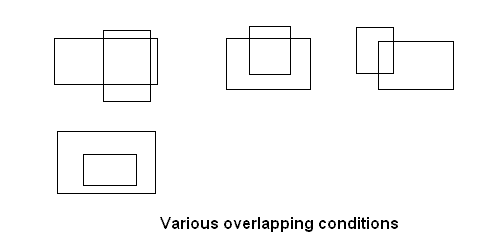
  • Two rectangles can overlap if one rectangle has 0,1,2,4 corners inside the other rectangle. The check of above mentioned condition could result is many different combinations. Remember overlapping rectangle cannot have 3 corners inside.
  • Other way we can say that two rectangle overlap if the region of one rectangle lies inside the other.

various overlapping possibilites

  • The best way to find is to identify whether an overlapping area is present or not which can be known if the below mentioned all conditions are true.

If we check that

·        The left edge of B is to the left of right edge of R.

·         The top edge of B is above the R bottom edge.

·         The right edge of B is to the right of left edge of R.

·        The bottom edge of B is below the R upper edge.

Then we can say that rectangles are overlapping.


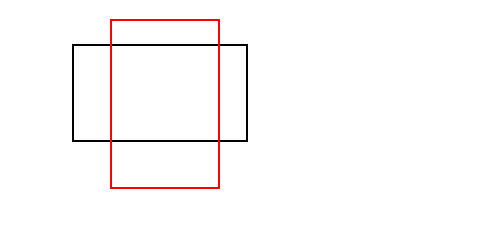
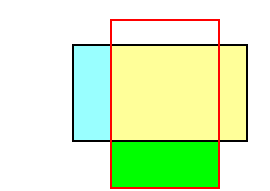
Consider an example: There are two rectangles as shown in diagram – Black Rectangle (B) and Red rectangle(R).

overlap21


If we check that

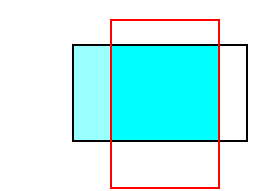
·        The left edge of B  is to the left of  right edge of  R. The selected area will be :

overlap1_11


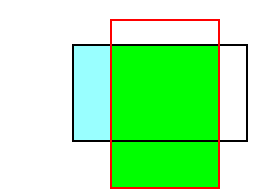
·        The top edge of B is above the R bottom edge. So the selected area will be:

overlap2_1

·        The right edge of B is to the right of left edge of R. The selected area will be:

overlap3_11


·        The bottom edge of B is below the R upper edge. The selected area will be:


overlap4_1


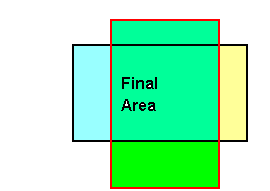
Hence all conditions are true we can say that rectangles are overlapping.

Therefore we can see that all the conditions are valid and hence rectangle is overlapping.


Below is the source code attached. The logic is only present in checkOverlap() method, rest is used to display the GUI and check.


package com;


import java.awt.*;

import java.awt.event.*;


import javax.swing.*;


public class RectangleOverlap extends JPanel{


      int r1x1,r1x2,r2x1,r2x2 ;

      int r1y1,r1y2,r2y1,r2y2 ;

            int r1width,r2width ;

            int r1height,r2height ;

      static JButton btn = new JButton(“Check”);

      public RectangleOverlap(int r1x1,int r1y1,int r1x2,int r1y2,int r2x1,int r2y1,int r2x2,int r2y2){

            this.r1x1=r1x1;

            this.r1x2=r1x2;

            this.r1y1=r1y1;

            this.r1y2=r1y2;

            this.r2x1=r2x1;

            this.r2x2=r2x2;

            this.r2y1=r2y1;

            this.r2y2=r2y2;

            r1width = Math.abs(r1x1-r1x2);

            r2width = Math.abs(r2x1-r2x2);

            r1height = Math.abs(r1y1-r1y2);

            r2height = Math.abs(r2y1-r2y2);

            addActionListener();

      }


      private void addActionListener() {

            btn.addActionListener(new ActionListener(){


                  public void actionPerformed(ActionEvent e) {

                        checkOverlap();

            }

            });


      }

      private void checkOverlap() {

            // condition to check whether the rectangles are overlapping or not.s

            boolean isOVerlap= ((r1x2 >= r2x1) &&

                  (r1y2 >= r2y1) &&

                  (r1x1 <= r2x2) &&

                (r1y1 <= r2y2));


      if(isOVerlap ){

            JOptionPane.showMessageDialog(null, “OVerlap”);

      }else{

            JOptionPane.showMessageDialog(null, “No OVerlap”);

      }

      }


      @Override

      protected void paintComponent(Graphics g) {

            g.drawRect(r1x1,r1y1 , r1width, r1height);

            g.setColor(new Color(123,232,122));

            g.drawRect(r2x1, r2y1, r2width,r2height);

      }


      public static void main(String args[]){

            JFrame frame = new JFrame();

            frame.setSize(500,500);

// input to check overlap condition.

// the order followed as : enter coordinate for 1st rectangle as lower limit and upper limit to rectangles          

            frame.getContentPane().add(new RectangleOverlap(20,30,120,130,10,50,160,120),BorderLayout.CENTER);

            frame.getContentPane().add(btn,BorderLayout.SOUTH);

            frame.addWindowListener(new WindowAdapter(){

                  @Override

                  public void windowClosing(WindowEvent e) {

                        System.exit(0);

                  }


            });

            frame.setVisible(true);

      }

}


How to create customized singly linked list


Linked list work on the concept of FIFO – First in First out. i.e the element inserted first will be the one retrieved first.

Create a class which will act as data structure and act as a single Node.

 public class MyList {


            public Object ob;

            public MyList next;


            public MyList(Object ob){

                        this.ob=ob;

            }

}

Now create a class to implement the basic functionality:

public class MyLinkedList {


            private MyList first=null;

            private MyList last=null;


            public MyLinkedList (){


            }

            public void add(Object o){

                        if(first == null){

                                    first = last= new MyList(o);

                        }else{

                                    last.next = new MyList(o);

                                    last= last.next;

                        }

            }

            private void getData(){

                        MyList temp =first;

                        do{

                                    System.out.println(temp.ob + ” “);

                                    temp=temp.next;

                        }while(temp != null);


            }

            private void delete(Object o){

                        MyList temp =first;

                        MyList prev =null;


                        do{

                                    if(temp.ob.equals(o)){

                                                prev.next=temp.next;

                                                break;

                                    }

                                    prev = temp;

                                    temp=temp.next;

                        }while(temp != null);


            }


public static void main(String args[]){

                         MyLinkedList lst = new MyLinkedList();

                         lst.add(6);

                         lst.add(62);

                         lst.add(16);

                         lst.add(65);

                         lst.add(26);

                         lst.add(25);

                         System.out.println(“After Insert”);

                         lst.getData();

                         lst.delete(16);

                         System.out.println(“After Delete”);

                         lst.getData();


            }

}

The output will be :

After Insert

6 62 16 65 26 25


After Delete

6 62 65 26 25


Google annouces Gmail offline…


Google will begin to offer browser-based offline access to its Gmail Webmail application, a much-awaited feature.

This functionality, which will allow people to use the Gmail interface when disconnected from the Internet, has been expected since mid-2007.

That’s when Google introduced Gears, a browser plug-in designed to provide offline access to Web-hosted applications like Gmail.

Gears is currently used for offline access to several Web applications from Google, like the Reader RSS manager and the Docs word processor, and from other providers like Zoho, which uses it for offline access to its e-mail and word processing browser-based applications.

Rajen Sheth, senior product manager for Google Apps, said that applying Gears to Gmail has been a very complex task, primarily because of the high volume of messages accounts can store. “Gmail was a tough hurdle,” he said.

Google ruled out the option of letting users replicate their entire Gmail inboxes to their PCs, which in many cases would translate into gigabytes of data flowing to people’s hard drives. It instead developed algorithms that will automatically determine which messages should be downloaded to PCs, taking into consideration a variety of factors that reflect their level of importance to the user, he said. At this point, end-users will not be able to tweak these settings manually.

“We had to make it such that we’re managing a sizable amount of information offline and doing it well in a way that’s seamless to the end-user,” he said.

For example, in Gmail, users can put labels on messages, as well as tag them with stars to indicate their importance, and Google can use that information to determine which messages to download. Sheth estimates that in most cases Gmail will download several thousand messages, preferring those that are more recent as well. Depending on the amount of messages users have on their accounts, they may get downloads going back two months or two years, he said.

Google will begin to roll out the Gmail offline functionality Tuesday evening and expects to make it available to everybody in a few days, whether they use Gmail in its standalone version or as part of the Apps collaboration and communication suite for organizations.

While the feature was “rigorously” tested internally at Google, it is a first, early release upon which Google expects to iterate and improve on. That’s why it’s being released under the Google Labs label. Users are encouraged to offer Google feedback.

Users have been able to manage their Gmail accounts offline via other methods for years, since Gmail supports the POP and IMAP protocols that let people download and send out messages using desktop e-mail software like Microsoft Outlook and others.

However, the Gears implementation will let people work within the Gmail interface without the need for a separate PC application. When offline, messages will be put in a Gears browser queue, and the desktop and online versions of the accounts will be synchronized automatically when users connect to the Internet again. This will come in handy for people who travel a lot and often find themselves without Internet access, Sheth said.