Is it right time to do MS in U.S?


Hi all readers,

Thanks for coming to my blog. I have applied for MS in comp science for fall 2009. I have got admission from University of Texas @ dallas and waiting for response from other colleges.
My profile is : I have currently 3.5 yrs of work exp in software industry with a secure job.
With the recession happening everywhere and worse hit US, I am confused that whether i should pursue higher studies or not. Got to US leaving my safe job and take a risk…
I would welcome any kind of viewpoint which could help me in making decision.

Thanks
rastogha

What is use of serialVersionUID


 During object serialization, the default Java serialization mechanism writes the metadata about the object, which includes the class name, field names and types, and superclass. This class definition is stored as a part of the serialized object. This stored metadata enables the deserialization process to reconstitute the objects and map the stream data into the class attributes with the appropriate type
Everytime an object is serialized the java serialization mechanism automatically computes a hash value. ObjectStreamClass’s computeSerialVersionUID() method passes the class name, sorted member names, modifiers, and interfaces to the secure hash algorithm (SHA), which returns a hash value.The serialVersionUID is also called suid.
So when the serilaize object is retrieved , the JVM first evaluates the suid of the serialized class and compares the suid value with the one of the object. If the suid values match then the object is said to be compatible with the class and hence it is de-serialized. If not InvalidClassException exception is thrown.

Changes to a serializable class can be compatible or incompatible. Following is the list of changes which are compatible:

  • Add fields
  • Change a field from static to non-static
  • Change a field from transient to non-transient
  • Add classes to the object tree

List of incompatible changes:

  • Delete fields
  • Change class hierarchy
  • Change non-static to static
  • Change non-transient to transient
  • Change type of a primitive field

So, if no suid is present , inspite of making compatible changes, jvm generates new suid thus resulting in an exception if prior release version object is used .
The only way to get rid of the exception is to recompile and deploy the application again.

If we explicitly metion the suid using the statement:

private final static long serialVersionUID = <integer value>

then if any of the metioned compatible changes are made the class need not to be recompiled. But for incompatible changes there is no other way than to compile again.

Use of hashcode() and equals()


Use of hashCode() and equals(). 

Object class provides two methods hashcode() and equals() to represent the identity of an object. It is a common convention that if one method is overridden then other should also be implemented.

Before explaining why, let see what the contract these two methods hold. As per the Java API documentation:

  • Whenever it is invoked on the same object more than once during an execution of a Java application, the hashcode() method must consistently return the same integer, provided no information used in equals() comparisons on the object is modified. This integer need not remain consistent from one execution of an application to another execution of the same application.
  • If two objects are equal according to the equals(object) method, then calling the hashCode() method on each of the two objects must produce the same integer result.
  • It is NOT required that if two objects are unequal according to the equals(Java.lang.Object) method, then calling the hashCode() method on each of the two objects must produce distinct integer results. However, the programmer should be aware that producing distinct integer results for unequal objects may improve the performance of hashtables.

Now, consider an example where the key used to store the in Hashmap is an Integer. Consider that Integer class doesn’t implement hashcode() method. Just for this example The code would look like:

  map.put(new Integer(5),”Value1″);
String value = (String) map.get(new Integer(5));
System.out.println(value);
//Output : Value is null

Null value will be displayed since the hashcode() method returns a different hash value for the Integer object created at line 2and JVM tries to search for the object at different location.

Now if the integer class has hashcode() method like:

public int hashCode(){
return value;
}

Everytime the new Integer object is created with same integer value passed; the Integer object will return the same hash value. Once the same hash value is returned, JVM will go to the same memory address every time and if in case there are more than one objects present for the same hash value it will use equals() method to identify the correct object.

Another step of caution that needs to be taken is that while implementing the hashcode() method the fields that are present in the hashcode() should not be the one which could change the state of object.

Consider the example:

publicclass FourWheeler implements Vehicle {


      private String name;

      privateintpurchaseValue;

      privateintnoOfTyres;

      public FourWheeler(){}


public FourWheeler(String name, int purchaseValue) {

            this.name = name;

            this.purchaseValue = purchaseValue;

      }

      publicvoid setPurchaseValue(int purchaseValue) {

            this.purchaseValue = purchaseValue;

      }


      @Override

      publicint hashCode() {

            finalint prime = 31;

            int result = 1;

            result = prime * result + ((name == null) ? 0 : name.hashCode());

            result = prime * result + purchaseValue;

            return result;

      }

}

FourWheeler fourWObj = new FourWheeler(“Santro”,”333333);
map.put(fourWObj,”Hyundai);
fourWObj.setPurchaseValue(“555555)
System.out.println(map.get(fourWObj));
//Output: null

We can see that inspite of passing the same object the value returned is null. This is because the hashcode() returned on evaluation will be different since the purchaseValue is set to ‘555555’ from ‘333333’. Hence we can conclude that the hashcode() should contain fields that doesn’t change the state of object.

One compatible, but not all that useful, way to define hashCode() is like this:

public int hashcode(){
return 0;
}

This approach will yield bad performance for the HashMap. The conclusion which can be made is that the hashcode() should(not must) return the same value if the objects are equal. If the objects are not equal then it must return different value.

Overriding equals() method

Consider the example:

publicclass StringHelper {


      private String inputString;


      public StringHelper(String string) {

            inputString=string;

      }


      @Override

      publicint hashCode() {

            returninputString.length();

      }


      publicstaticvoid main(String[] args) {


            StringHelper helperObj = new StringHelper(“string”);

            StringHelper helperObj1 = new StringHelper(“string”);

            if(helperObj.hashCode() == helperObj1.hashCode()){

                  System.out.println(“HashCode are equal”);

            }

            if(helperObj.equals(helperObj1)){

                  System.out.println(“Objects are equal”);

            }else{

                  System.out.println(“Objects are not equal”);

            }


      }


      public String getInputString() {

            returninputString;

      }


// Output:
HashCode are equal
Objects are not equal

We can see that even though the StringHelper object contains the same value the equals method has returned false but the hashcode method has return true value.

To prevent this inconsistency, we should make sure that we override both methods such that the contract between both methods doesn’t fail.

Steps that need to be taken into consideration while implementing equals method.

1. Use the == operator to check if the argument is a reference to this object.                                                                If so, return true. This is just a performance optimization, but one that is worth doing if the comparison is potentially expensive.

2. Use the instanceof operator to check if the argument has the correct type.

If not, return false. Typically, the correct type is the class in which the method occurs. Occasionally, it is some interface implemented by this class. Use an interface if the class implements an interface that refines the equals contract to permit comparisons across classes that implement the interface. Collection interfaces such as Set, List, Map, and Map.Entry have this property.

3. Cast the argument to the correct type. Because this cast was preceded by an instanceof test, it is guaranteed to succeed.

4. For each “significant” field in the class, checks if that field of the argument matches the corresponding field of this object.          If all these tests succeed, return true; otherwise, return false

5. When you are finished writing your equals method, ask yourself three questions: Is it symmetric? Is it transitive? Is it consistent?

The correct implementation if equals method for the StringHelper class could be:

@Override

      publicboolean equals(Object obj) {

            if (this == obj)

                  returntrue;

            if (obj == null)

                  returnfalse;

            if (getClass() != obj.getClass())

                  returnfalse;

            final StringHelper other = (StringHelper) obj;

            if (inputString == null) {

                  if (other.inputString != null)

                        returnfalse;

            } elseif (!inputString.equals(other.inputString))

                  returnfalse;

            returntrue;

      }
 

Program to check rectangle overlapping.


Algorithm : 

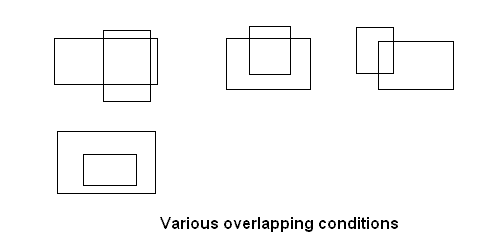
  • Two rectangles can overlap if one rectangle has 0,1,2,4 corners inside the other rectangle. The check of above mentioned condition could result is many different combinations. Remember overlapping rectangle cannot have 3 corners inside.
  • Other way we can say that two rectangle overlap if the region of one rectangle lies inside the other.

various overlapping possibilites

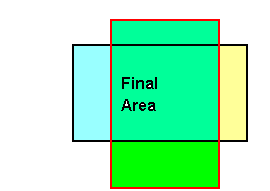
  • The best way to find is to identify whether an overlapping area is present or not which can be known if the below mentioned all conditions are true.

If we check that

·        The left edge of B is to the left of right edge of R.

·         The top edge of B is above the R bottom edge.

·         The right edge of B is to the right of left edge of R.

·        The bottom edge of B is below the R upper edge.

Then we can say that rectangles are overlapping.


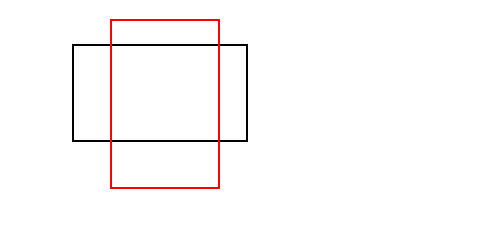
Consider an example: There are two rectangles as shown in diagram – Black Rectangle (B) and Red rectangle(R).

overlap21


If we check that

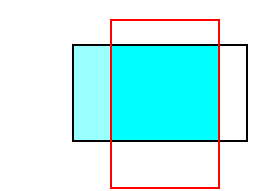
·        The left edge of B  is to the left of  right edge of  R. The selected area will be :

overlap1_11


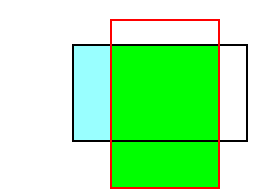
·        The top edge of B is above the R bottom edge. So the selected area will be:

overlap2_1

·        The right edge of B is to the right of left edge of R. The selected area will be:

overlap3_11


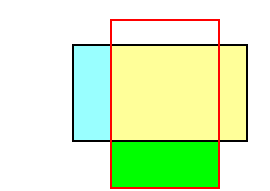
·        The bottom edge of B is below the R upper edge. The selected area will be:


overlap4_1


Hence all conditions are true we can say that rectangles are overlapping.

Therefore we can see that all the conditions are valid and hence rectangle is overlapping.


Below is the source code attached. The logic is only present in checkOverlap() method, rest is used to display the GUI and check.


package com;


import java.awt.*;

import java.awt.event.*;


import javax.swing.*;


public class RectangleOverlap extends JPanel{


      int r1x1,r1x2,r2x1,r2x2 ;

      int r1y1,r1y2,r2y1,r2y2 ;

            int r1width,r2width ;

            int r1height,r2height ;

      static JButton btn = new JButton(“Check”);

      public RectangleOverlap(int r1x1,int r1y1,int r1x2,int r1y2,int r2x1,int r2y1,int r2x2,int r2y2){

            this.r1x1=r1x1;

            this.r1x2=r1x2;

            this.r1y1=r1y1;

            this.r1y2=r1y2;

            this.r2x1=r2x1;

            this.r2x2=r2x2;

            this.r2y1=r2y1;

            this.r2y2=r2y2;

            r1width = Math.abs(r1x1-r1x2);

            r2width = Math.abs(r2x1-r2x2);

            r1height = Math.abs(r1y1-r1y2);

            r2height = Math.abs(r2y1-r2y2);

            addActionListener();

      }


      private void addActionListener() {

            btn.addActionListener(new ActionListener(){


                  public void actionPerformed(ActionEvent e) {

                        checkOverlap();

            }

            });


      }

      private void checkOverlap() {

            // condition to check whether the rectangles are overlapping or not.s

            boolean isOVerlap= ((r1x2 >= r2x1) &&

                  (r1y2 >= r2y1) &&

                  (r1x1 <= r2x2) &&

                (r1y1 <= r2y2));


      if(isOVerlap ){

            JOptionPane.showMessageDialog(null, “OVerlap”);

      }else{

            JOptionPane.showMessageDialog(null, “No OVerlap”);

      }

      }


      @Override

      protected void paintComponent(Graphics g) {

            g.drawRect(r1x1,r1y1 , r1width, r1height);

            g.setColor(new Color(123,232,122));

            g.drawRect(r2x1, r2y1, r2width,r2height);

      }


      public static void main(String args[]){

            JFrame frame = new JFrame();

            frame.setSize(500,500);

// input to check overlap condition.

// the order followed as : enter coordinate for 1st rectangle as lower limit and upper limit to rectangles          

            frame.getContentPane().add(new RectangleOverlap(20,30,120,130,10,50,160,120),BorderLayout.CENTER);

            frame.getContentPane().add(btn,BorderLayout.SOUTH);

            frame.addWindowListener(new WindowAdapter(){

                  @Override

                  public void windowClosing(WindowEvent e) {

                        System.exit(0);

                  }


            });

            frame.setVisible(true);

      }

}


How to create customized singly linked list


Linked list work on the concept of FIFO – First in First out. i.e the element inserted first will be the one retrieved first.

Create a class which will act as data structure and act as a single Node.

 public class MyList {


            public Object ob;

            public MyList next;


            public MyList(Object ob){

                        this.ob=ob;

            }

}

Now create a class to implement the basic functionality:

public class MyLinkedList {


            private MyList first=null;

            private MyList last=null;


            public MyLinkedList (){


            }

            public void add(Object o){

                        if(first == null){

                                    first = last= new MyList(o);

                        }else{

                                    last.next = new MyList(o);

                                    last= last.next;

                        }

            }

            private void getData(){

                        MyList temp =first;

                        do{

                                    System.out.println(temp.ob + ” “);

                                    temp=temp.next;

                        }while(temp != null);


            }

            private void delete(Object o){

                        MyList temp =first;

                        MyList prev =null;


                        do{

                                    if(temp.ob.equals(o)){

                                                prev.next=temp.next;

                                                break;

                                    }

                                    prev = temp;

                                    temp=temp.next;

                        }while(temp != null);


            }


public static void main(String args[]){

                         MyLinkedList lst = new MyLinkedList();

                         lst.add(6);

                         lst.add(62);

                         lst.add(16);

                         lst.add(65);

                         lst.add(26);

                         lst.add(25);

                         System.out.println(“After Insert”);

                         lst.getData();

                         lst.delete(16);

                         System.out.println(“After Delete”);

                         lst.getData();


            }

}

The output will be :

After Insert

6 62 16 65 26 25


After Delete

6 62 65 26 25