Connecting database using Spring JdbcTemplate


Another salient feature of Spring is to connect and work with database at great ease which is what I am going to demonstrate.
This article is the basic to load and configure beans to interact with DB and aims to help people who are trying to user the spring ‘JdbcTemplate’ for the first time.

Configurations:
1) Download Spring 3.0.zip from http://www.springframework.org and extract it.
2) Create a normal Java project using ecplise.
3) Database I am using in MySQL so download Mysql driver class

There are several ways in which DB can be access.
JdbcTemplate is the classic Spring JDBC approach and the most popular. This “lowest level” approach and all others use a JdbcTemplate under the covers, and all are updated with Java 5 support such as generics and varargs.
NamedParameterJdbcTemplate wraps a JdbcTemplate to provide named parameters instead of the traditional JDBC “?” placeholders. This approach provides better documentation and ease of use when you have multiple parameters for an SQL statement.
SimpleJdbcTemplate combines the most frequently used operations of JdbcTemplate and NamedParameterJdbcTemplate.
SimpleJdbcInsert and SimpleJdbcCall optimize database metadata to limit the amount of necessary configuration. This approach simplifies coding so that you only need to provide the name of the table or procedure and provide a map of parameters matching the column names. This only works if the database provides adequate metadata. If the database doesn’t provide this metadata, you will have to provide explicit configuration of the parameters.
• RDBMS Objects including MappingSqlQuery, SqlUpdate and StoredProcedure requires you to create reusable and thread-safe objects during initialization of your data access layer. This approach is modeled after JDO Query wherein you define your query string, declare parameters, and compile the query. Once you do that, execute methods can be called multiple times with various parameter values passed in.

Extracted from Spring jdbc docs

The demo is done using JdbcTemplate.

1) Configure the Datasource in the “spring.xml”. One needs to configure the connection properties in the spring.xml

<?xml version="1.0" encoding="UTF-8"?>
<beans xmlns="http://www.springframework.org/schema/beans"
    xmlns:xsi="http://www.w3.org/2001/XMLSchema-instance"
    xmlns:context="http://www.springframework.org/schema/context"
    xsi:schemaLocation="
        http://www.springframework.org/schema/beans
        http://www.springframework.org/schema/beans/spring-beans-3.0.xsd
        http://www.springframework.org/schema/context
        http://www.springframework.org/schema/context/spring-context-3.0.xsd">
    
    <bean id="jdbcDao" class="JDBC_Acess">
        <property name="dataSource" ref="dataSource"/>
    </bean>
    
    <bean id="dataSource" class="org.apache.commons.dbcp.BasicDataSource" destroy-method="close">
        <property name="driverClassName" value="com.mysql.jdbc.Driver"/>
        <property name="url" value="jdbc:mysql://localhost:3306/reco_engine"/>
        <property name="username" value="root"/>
        <property name="password" value="root"/>
    </bean>


</beans>

2) Create a Dao class and configure the bean in the “spring.xml”. Here the class is “JDBCDao.java”. The datasource property created in step 1 is configured for the Dao class.
3) In JDBCDao class the object of JdbcTemplate is created with the constructor argument as Datasource configured in step 1.

public class JDBCDao {

	 private JdbcTemplate jdbcTemplate;

	    private void getUser(){
	    	String sql = "select * from users";
	    	try{
	    	List list = jdbcTemplate.query(sql, new UserMapper());
	    	System.out.println("Total Records "+ list.size());
	    	}catch(DataAccessException e){
	    		e.printStackTrace();
	    	}
	    }
	    private void insertUser(){
	    	String sql = "insert into users values ('21','spring,java,perl,oracle','golf,cooking,music,cricket','3','embedded','7','victor','mathews','team lead','NULL')";
	    	try{
	    	 jdbcTemplate.update(sql);
	    	 System.out.println("record inserted succesffuly");
	    	}catch(DataAccessException e){
	    		e.printStackTrace();
	    	}
	    }
	public static void main(String[] args) {
		
		ApplicationContext context = new ClassPathXmlApplicationContext("spring.xml");
		JDBCDao dao = (JDBCDao)context.getBean("jdbcDao");
		dao.getUser();
		dao.insertUser();
	}
	
	
	public void setDataSource(DataSource dataSource) {
        this.jdbcTemplate = new JdbcTemplate(dataSource);
    }

}
class UserMapper implements RowMapper{

	@Override
	public User mapRow(ResultSet rs, int arg1) throws SQLException {

		User user = new User();
		user.setFirstName(rs.getString("firstName"));
		user.setLastName(rs.getString("lastName"));
		return user;
	}
	
}

Swing : Use JTable to display a List of Objects


Delicious
Consider I have a class Word_Analysis which contains following parameters.

class Word_Analysis {

boolean isAllCap;
String word;
int length;
boolean isInitialCap;
boolean isRoman;
boolean isDigit;
//create getter and setters
}

To display the records of Entity objects , an object of DetaultTableModel has to be created and set it to table. Some methods need to be overloaded and its mandatory to do it. Below code is the minimum methods required.

class TableModel extends AbstractTableModel{

List wordsList;
String headerList[] = new String[]{“Col1”,”Col2”,”Col3”,”Col4”,”Col5”};

public TableModel(List list) {
wordsList = list;
}

@Override
public int getColumnCount() {
return 5;
}


@Override
public int getRowCount() {
return wordsList.size();
}

// this method is called to set the value of each cell
@Override
public Object getValueAt(int row, int column) {
Word_Analysis entity = null;
entity= wordsList.get(row);

switch (column) {

case 0:
return entity.word;
case 1:
return entity.length;
case 2:
return entity.isAllCap();
case 3:
return entity.isIntialCap();
case 4:
return entity.isDigit();
case 5:
return entity.isRoman();

default :

return "";
}


 //This method will be used to display the name of columns
public String getColumnName(int col) {
return headerList[col];
}
}

Once the model class is created create the model object and set it to table

public class DisplayTable{
public static void main(String args[]){
List entityList = new ArrayList();
//set the entity objects in the list
JFrame frame = new JFrame();
JTable table = new JTable();
DefaultTableModel model = new TableModel(entityList);
JScrollPane scrollPane = new JScrollPane(table);
table.setModel(model);
frame.getContentPane().add(scrollPane, BorderLayout.CENTER);

frame.pack();
frame.setDefaultCloseOperation(JFrame.EXIT_ON_CLOSE);
frame.setVisible(true);
}
}

How to install python plugin for eclipse :Pydev tutorial


1)      The plugin which I use to develop Python programs on Eclipse is Pydev. It’s a free plugin and can be downloaded from hereDownload

2)      Install the Pydev by just following the instructions

3)      Once the Pydev is installed open eclipse

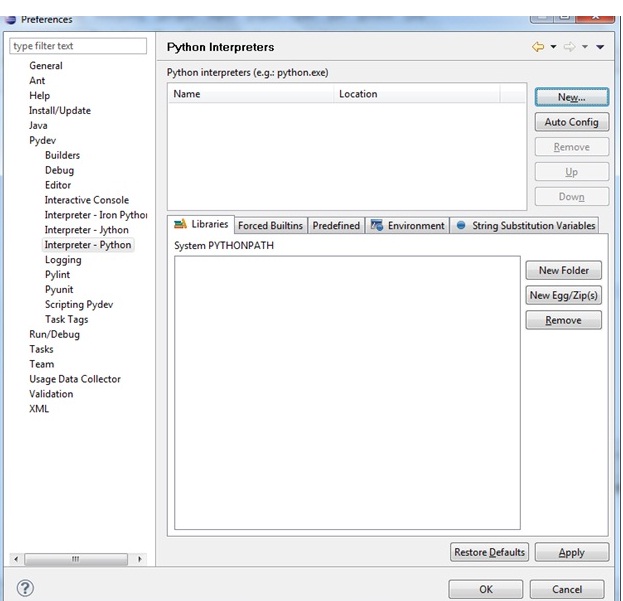
4)      Goto Window -> Preferences -> Pydev -> Interpreter Python

5)      Click on the New Button

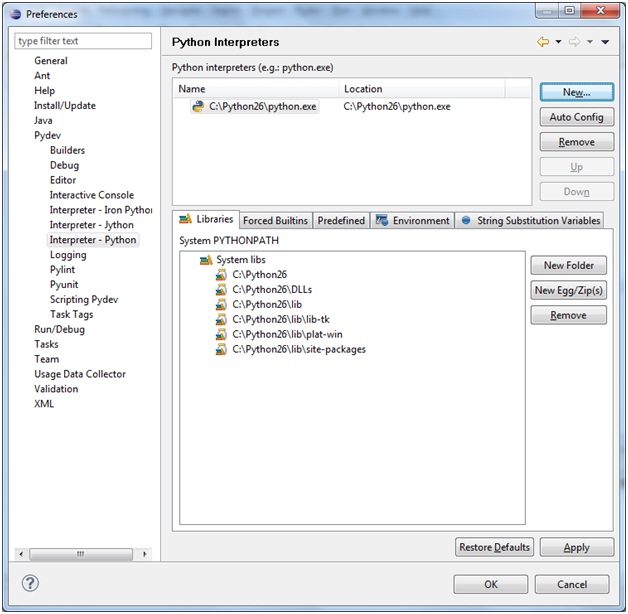
6)      Select the path where the “python.exe” is present and click on OK

7)      If the path is successfully found the screen should look like this

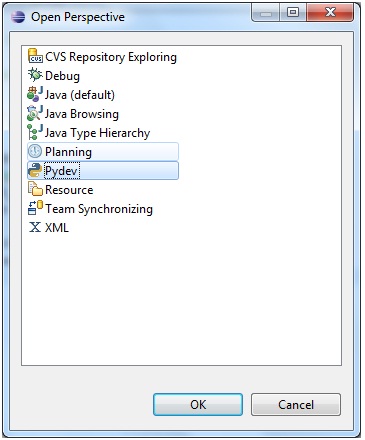
8)      Click on OK. Now goto Window -> Open Perspective

9)      Select the Pydev perspective , which means the plugin is successfully configured and you are ready to write the first program.

10)      Goto File -> New -> PyDevProject

11)      After Click on Finish , the project appear is “PyDev Package Explorer”.

12)      Right Click on src -> New -> PyDev Module

13)      Enter the name of program and click on Finish.

14)      The screen should appear as follows

16)      Instead of “pass” write

print ‘Hello World’

17)      Run the program with the play button as a normal java program runs.

18)      Check the console screen to see “Hello World”

IntegerCache in JDK1.5


What is the O/p of following ?

Integer i1 = 20;
Integer i2 = 20;
Integer i3 = 200;
Integer i4 = 200;

if(i1 == i2){
System.out.println("True");
}else{
System.out.println("False");
}

if(i3 == i4){
System.out.println("True");
}else{
System.out.println("False");
}

if(Integer.valueOf(20) == Integer.valueOf(20)){
System.out.println("True");
}else{
System.out.println("False");
}

if(Integer.valueOf(200) == Integer.valueOf(200)){
System.out.println("True");
}else{
System.out.println("False");
}

The answer is
True
False
True
False
It is because in JDK1.5 there is a new concept called Caching Integer Objects.

Until JDK1.5 it didn’t matter whether to use Integer.valueof() or new Integer() methods to create an integer object.But with the jdk1.5 feature it is recommended to use Integer.valueOf().

Reason : In JDK1.5 the JVM caches Integer objects from range of -128 to 127 . So every time an integer object is create with value between the above mentioned range same object will be returned instead of creating the new object.

For the given statement
Integer i1 = 20.
The autoboxing features come into play which uses again the Integer.valueOf() method to create an object and every time will return same object.

Note: This will not happen for Integer i1 = new Integer(20). // Something similar to String pool

The Integer class has an inner class called IntegerCache with the following implementation.

private static class IntegerCache {
static final int high;
static final Integer cache[];

static {
final int low = -128;

int h = 127;
if (integerCacheHighPropValue != null) {
int i = Long.decode(integerCacheHighPropValue).intValue();
i = Math.max(i, 127);
h = Math.min(i, Integer.MAX_VALUE - -low);
}
high = h;

cache = new Integer[(high - low) + 1];
int j = low;
for(int k = 0; k < cache.length; k++)
cache[k] = new Integer(j++);
}

private IntegerCache() {}
}

Since its an inner class, so the 256 objects will not be created until it is called for the first time. Hence, initial loading of the first integer object will be slow as cache array with 256 objects will be created.

The valueOf() method implementation is :


public static Integer valueOf(int i) {
if(i >= -128 && i <= IntegerCache.high)
return IntegerCache.cache[i + 128];
else
return new Integer(i);
}