Integrate nokia series40 sdk with eclipse


Steps to download and install the Series40 SDK and integrate with eclipse:
1. Download the Series40 Sdk from Nokia SDK
2. Series 40 sdk runs only on windows.
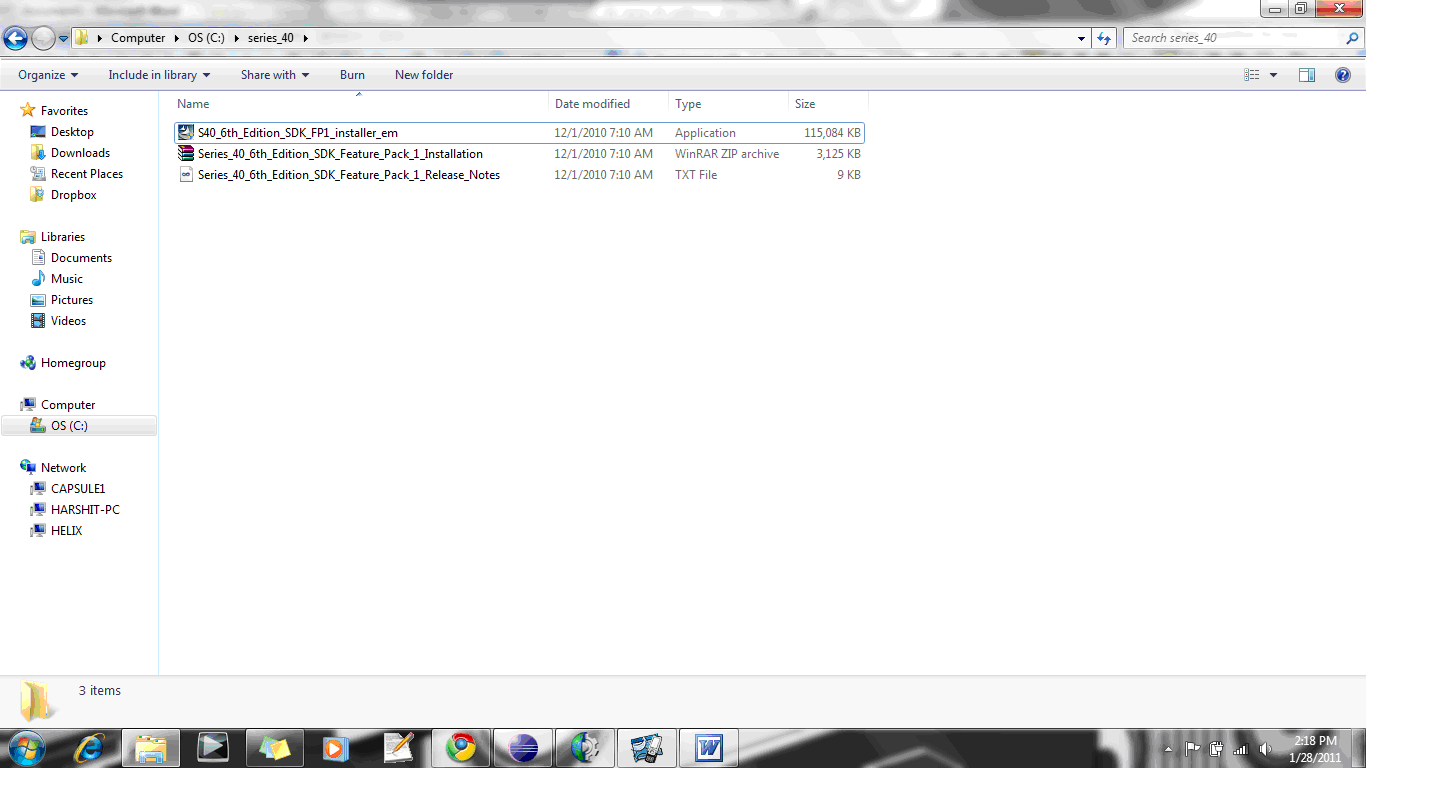
3. Extract the file and structure should be something like:

4. The folder contains a exe , zip and txt file.
5. Run the exe to install the SDK.
6. Once done extract the Series_40_6th_Edition_SDK_Feature_Pack_1_Installation.zip inside main folder. It contains a installation Pdf .
7. Open the Pdf and follow the instructions given to integrate with the Eclipse.
8. Once done, restart the eclipse.

Create the project in eclipse:
1. Create a new project J2ME -> J2ME Midlet Suite.
2. Create new Class “hello world”.
3. Type in the following code :

import javax.microedition.midlet.MIDlet;
import javax.microedition.lcdui.*;

public class HelloWorld extends MIDlet implements CommandListener {

public HelloWorld() {
}
// Display
private Display display;
// Main form
private Form form;
// For the message
private StringItem stringItem;
// For the exit command
private Command exitCommand;

public void commandAction(Command command, Displayable displayable) {
if (displayable == form) {
if (command == exitCommand) {
exitMIDlet();
}
}
}

public void startApp() {
// Create form
stringItem = new StringItem("Hello", "Hello World!");
form = new Form(null, new Item[] {stringItem});
exitCommand = new Command("Exit", Command.EXIT, 1);
form.addCommand(exitCommand);
form.setCommandListener(this);

// Get display for drawning
display = Display.getDisplay(this);
display.setCurrent(form);
}

// Your MIDlet should not call pauseApp(), only system will call this life-cycle method
public void pauseApp() {
}

// Your MIDlet should not call destroyApp(), only system will call this life-cycle method
public void destroyApp(boolean unconditional) {
}

public void exitMIDlet() {
display.setCurrent(null);
notifyDestroyed();
}

}

Run the project in Eclipse:
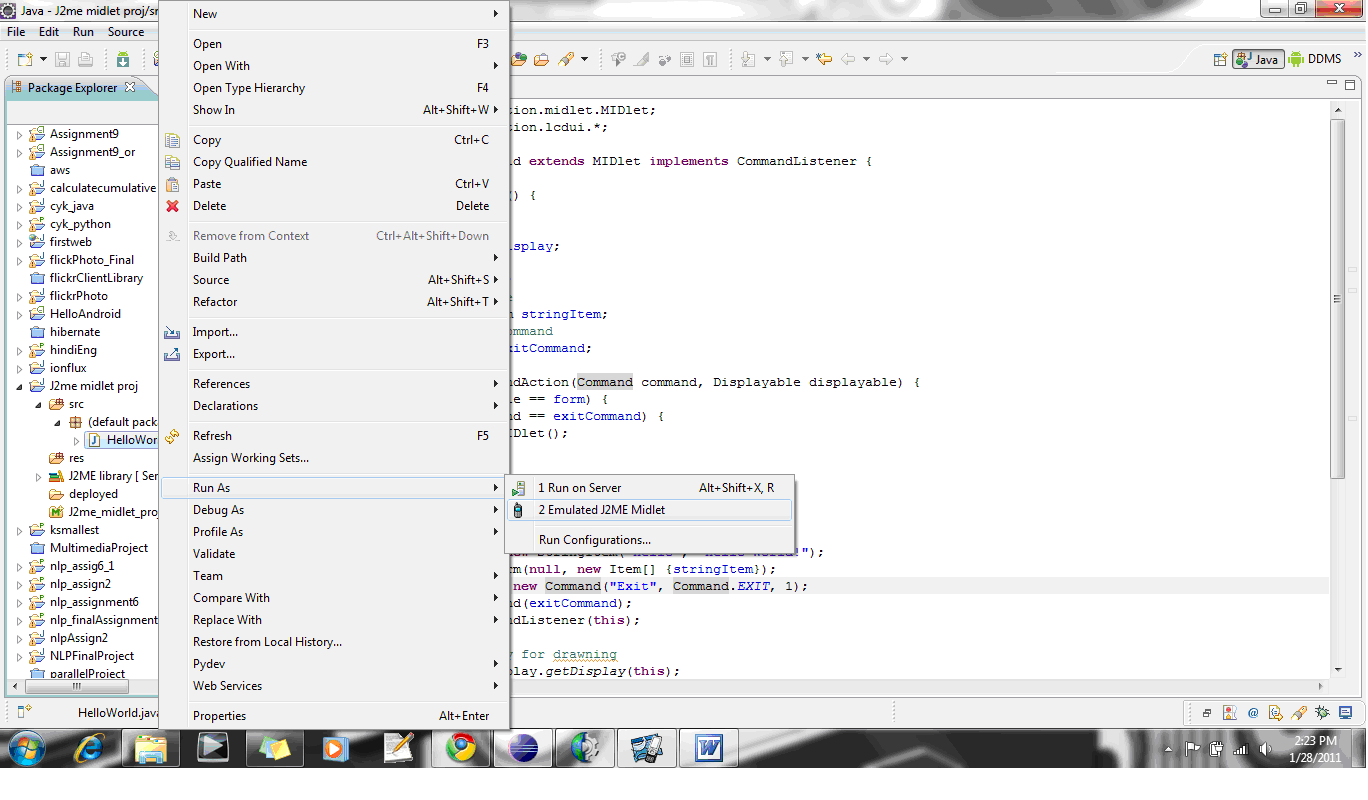
Right click on the HelloWorld Class. Select Run As -> Emulated J2ME Midlet .

The emulator takes around 30-45 secs to start.

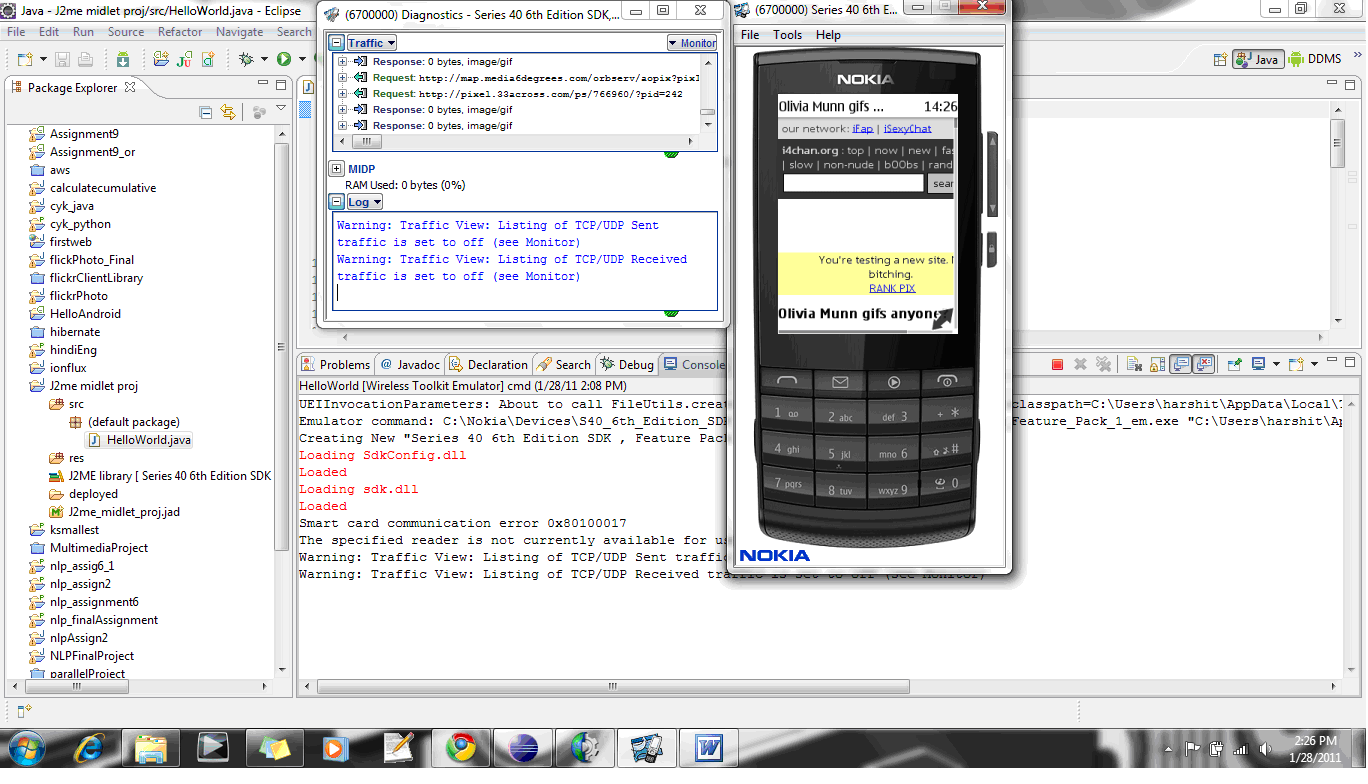
Once the emulator is started following screen will be up:

2010 in review


The stats helper monkeys at WordPress.com mulled over how this blog did in 2010, and here’s a high level summary of its overall blog health:

Healthy blog!

The Blog-Health-o-Meter™ reads Wow.

Crunchy numbers

Featured image

A helper monkey made this abstract painting, inspired by your stats.

Madison Square Garden can seat 20,000 people for a concert. This blog was viewed about 65,000 times in 2010. If it were a concert at Madison Square Garden, it would have performed about 3 times.

In 2010, there were 13 new posts, growing the total archive of this blog to 77 posts. There were 16 pictures uploaded, taking up a total of 933kb. That’s about a picture per month.

The busiest day of the year was June 5th with 479 views. The most popular post that day was Connecting database using Spring JdbcTemplate.

Where did they come from?

The top referring sites in 2010 were java-questions.com, dzone.com, google.co.in, stackoverflow.com, and google.com.

Some visitors came searching, mostly for spring aop tutorial, spring properties file, spring aop example, java equals, and aop tutorial.

Attractions in 2010

These are the posts and pages that got the most views in 2010.

1

Connecting database using Spring JdbcTemplate June 2010
4 comments

2

Spring AOP tutorial -I May 2009
14 comments

3

how to access properties file in Spring March 2009
2 comments

4

Use of hashcode() and equals() February 2009
12 comments

5

What is difference between == and equals() in java? March 2009
4 comments

JGoodies: Better way to design clean swing layout


JGoodies:
A new and clean way to design a swing screens.

The advantages I found using it over swing layout:
1) Less code
2) Easy to design
3) Any complex design possible
4) Very fast to learn. (even if you are designing layout for the first time)

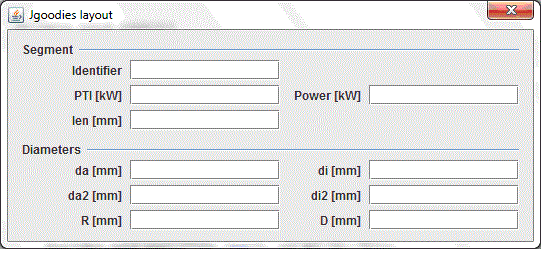
Lets start with designing a simple screen:

JGoodies layout are pretty much similar to GridBag Layout.
1) Keep a preview of screen.
2) Divide the screens into number of rows and columns. The screen becomes like a matrix and now we will try to have components in each cell.

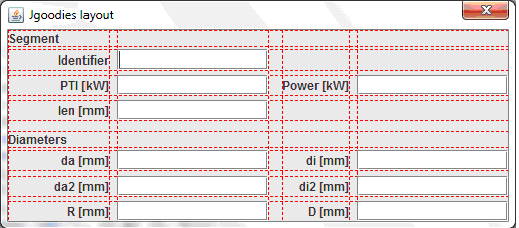
For above screen shot I will preview my design as:

The screen is divided into 7 columns and 15 rows. Note the space between a Jlabel and a Jtextfield is also considered as a cell and hence a columns. Similarily space between two rows is also consider as space and counted.

The code for the designing the screen:

public class MainFrame extends JDialog{
	
	JTextField txt1 = new JTextField();
	JTextField txt2 = new JTextField();
	JTextField txt3 = new JTextField();
	JTextField txt4 = new JTextField();
	JTextField txt5 = new JTextField();
	JTextField txt6 = new JTextField();
	JTextField txt7 = new JTextField();
	JTextField txt8 = new JTextField();
	JTextField txt9 = new JTextField();
	JTextField txt10 = new JTextField();
	
	public MainFrame(){
		init();
	}
	
	private void init(){
		setTitle("Jgoodies layout");
		FormLayout layout = new FormLayout("pref, 4dlu, 75dlu, 7dlu, pref, 4dlu, 75dlu","p, 2dlu, p, 3dlu, p, 3dlu, p, 7dlu,p, 2dlu, p, 3dlu, p, 3dlu, p");
		PanelBuilder builder = new PanelBuilder(layout);
		CellConstraints cc = new CellConstraints();
		builder.add(new JLabel("Segment"), cc.xyw(1, 1, 7));
		builder.add(new JLabel("Identifier"), cc.xy (1, 3));
		builder.add(txt1, cc.xy (3, 3));
		builder.add(new JLabel("PTI [kW]"), cc.xy (1, 5));
		builder.add(txt9, cc.xy (3, 5));
		builder.add(new JLabel("Power [kW]"), cc.xy (5, 5));
		builder.add(txt2, cc.xy (7, 5));
		builder.add(new JLabel("len [mm]"), cc.xy (1, 7));
		builder.add(txt3, cc.xy (3, 7));
		builder.add(new JLabel("Diameters"), cc.xyw(1, 9, 7));
		builder.add(new JLabel("da [mm]"), cc.xy (1, 11));
		builder.add(txt4, cc.xy (3, 11));
		builder.add(new JLabel("di [mm]"), cc.xy (5, 11));
		builder.add(txt5, cc.xy (7, 11));
		builder.add(new JLabel("da2 [mm]"), cc.xy (1, 13));
		builder.add(txt6, cc.xy (3, 13));
		builder.add(new JLabel("di2 [mm]"), cc.xy (5, 13));
		builder.add(txt7, cc.xy (7, 13));
		builder.add(new JLabel("R [mm]"), cc.xy (1, 15));
		builder.add(txt8, cc.xy (3, 15));
		builder.add(new JLabel("D [mm]"), cc.xy (5, 15));
		builder.add(txt10, cc.xy (7, 15));
		add(builder.getPanel());
		pack();
		setVisible(true);
	}
	
	public static void main(String args[]){
		new MainFrame();
	}
}

About code:
1) class FormLayout is used to tell the panel about the number of rows and columns
a. The constructor takes no of columns and rows as arguments.
b. Note in the constructor by the size of columns and row is defined in dlu unit. ‘p’ or ‘pref’ is used to let the layout choose a preferred size on its own. It basically takes the largest size among all components in that row or column.
2) class PanelBuilder is used to create the panel and add Components to it.
3) class Cellconstraints tells the Panelbuilder where to place to components.

Advance Features:

• Sometimes it gets tough to understand where to place the the components.
Class FormDebugPanel helps in displaying the design of the screen with red lines. This helps in understanding how the layout is present and where the components are placed.
Just change the following lines and you can see the image 2 as shown above:
PanelBulder builder = new PanelBulder (layout);
add(builder.getPanel());
to
FormDebugPanel builder = new FormDebugPanel(layout);
add(builder);

• Single component like text box can also be spanned across multiple columns and/or rows
Instead of using cc.xy try to play with cc.xywh().
• Also the components can be center, right, left etc aligned . The values are passed in
cc.xy() or cc.xywh() .
Eg. cc.xy(2,2,CellConstraints.RIGHT, CellConstraints.CENTER)

• If you want to add the rows dynamically to the panel.
Construct the object of FormLayout as :

FormLayout layout = new FormLayout(
“pref, 4dlu, 80dlu, 7dlu,pref, 4dlu, 80dlu”, “”); // add rows dynamically

DefaultFormBuilder builder = new DefaultFormBuilder(layout);
builder.setDefaultDialogBorder();
builder.appendSeparator(“Segment”);
builder.append(“Identifier”, new JTextField(“10000”));
builder.nextLine();
builder.append(“PTI [kW]”, new JTextField(“10000”));
builder.append(“Power [kW]”, new JTextField(“10000”));
builder.append(“len [mm]”, new JTextField(“10000”));

Each new component is added to the next alternate column. IF the column exceeds it goes to the next row and start adding from the 1st column. When I say alternate column, in the above example components are added to 1st, 3rd,5th,7th column.

• Sometimes it is required that the size of components are increased or decreased if the panel is resizable.
new FormLayout(“right:pref, 10px,pref:grow”,””);

Here the 1st column is right aligned by default and 3rd column is set to resizable by setting it as “grow”. Only the 3rd column will be resized and not the 1st column.
How to configure Hibernate in Spring.


The objective of the tutorial is to understand how the DB can be configured in Spring using Hibernate.
To start with download:
1) spring jars
2) hibernate jars
3) mysql driver

Following is the list of jars I used.

1) create a Db in mysql with name “reco_engine”;
2) Create a table User and add some columns to it.
3) Insert some records into the table using mysql..

<?xml version="1.0" encoding="UTF-8"?>
<beans xmlns="http://www.springframework.org/schema/beans"
xmlns:xsi="http://www.w3.org/2001/XMLSchema-instance"
xmlns:context="http://www.springframework.org/schema/context"
xsi:schemaLocation="
http://www.springframework.org/schema/beans
http://www.springframework.org/schema/beans/spring-beans-3.0.xsd
http://www.springframework.org/schema/context
http://www.springframework.org/schema/context/spring-context-3.0.xsd">

<bean id="hibernateDao" class="HibernateAccessDao">
<property name="hibernateTemplate">
<ref bean="hibernateTemplate"/>
</property>
</bean>
<bean id="dataSource" class="org.apache.commons.dbcp.BasicDataSource" destroy-method="close">
<property name="driverClassName" value="com.mysql.jdbc.Driver"/>
<property name="url" value="jdbc:mysql://localhost:3306/reco_engine"/>
<property name="username" value="root"/>
<property name="password" value="root"/>
</bean>

<bean id="mySessionFactory"
class="org.springframework.orm.hibernate3.LocalSessionFactoryBean">
<property name="dataSource" ref="dataSource"/>
<property name="mappingResources">
<list>
<value>Users.hbm.xml</value>
</list>
</property>
<property name="hibernateProperties">
<value>hibernate.dialect=org.hibernate.dialect.HSQLDialect</value>
</property>
</bean>

<bean id="hibernateTemplate"
class="org.springframework.orm.hibernate3.HibernateTemplate">
<property name="sessionFactory">
<ref bean="mySessionFactory"/>
</property>
</bean>
</beans>

The bean “datasource” is used to configure the properties of the DB.
The bean “mySessionFactory” is used to maintain the session of hibernate. This is taken care by the spring container now.
The property “mappingResources” takes the list of hbm files which will be mapped to this session. Also the datasource property is set in this bean.

The bean hibernateTemplate is the one used to interact with the DB. The Spring application context will manage its lifecycle, initializing and shutting down the factory as part of the application. LocalSessionFactoryBean is the preferred way of obtaining a reference to a specific Hibernate SessionFactory, at least in a non-EJB environment.

The bean “hibernateDao” is the java class and the hibernateTemplate property is set.

The Users table has to be mapped in Hibernate. To map it , Users.java and Users.hbm.xml need to be created . I have used the Hibernate plugin for eclipse provided by JBoss to generate the files automatically. http://jboss.org/tools

The files will be as follows:


public class Users  implements java.io.Serializable {


    // Fields    

     private int id;
     private String firstname;
     private String lastname;
    
    // Constructors

    /** default constructor */
    public Users() {
    }

	/** minimal constructor */
    public Users(int id) {
        this.id = id;
    }
    
  
    // Property accessors

    public int getId() {
        return this.id;
    }
    
    public void setId(int id) {
        this.id = id;
    }

      public String getFirstname() {
        return this.firstname;
    }
    
    public void setFirstname(String firstname) {
        this.firstname = firstname;
    }

    public String getLastname() {
        return this.lastname;
    }
    
    public void setLastname(String lastname) {
        this.lastname = lastname;
    }
}

The Users.hbm.xml


<?xml version="1.0"?>
<!DOCTYPE hibernate-mapping PUBLIC "-//Hibernate/Hibernate Mapping DTD 3.0//EN"
"http://hibernate.sourceforge.net/hibernate-mapping-3.0.dtd">
<!-- Generated Jun 3, 2010 9:15:59 PM by Hibernate Tools 3.1.0.beta4 -->
<hibernate-mapping>
    <class name="Users" table="users" catalog="reco_engine">
        <id name="id" type="int">
            <column name="id" />
            <generator class="assigned" />
        </id>
        <property name="firstname" type="string">
            <column name="firstname" length="45" />
        </property>
        <property name="lastname" type="string">
            <column name="lastname" length="45" />
        </property>
        <property name="designation" type="string">
            <column name="designation" length="45" />
        </property>
        <property name="department" type="string">
            <column name="department" length="45" />
        </property>
    </class>
</hibernate-mapping>

The Dao class to interact with the database:


public class HibernateAccessDao {

	HibernateTemplate hibernateTemplate;

	public void setHibernateTemplate(HibernateTemplate hibernateTemplate) {
		this.hibernateTemplate = hibernateTemplate;
	}

	public static void main(String[] args) {
		// TODO Auto-generated method stub
		ApplicationContext context =   new ClassPathXmlApplicationContext("spring.xml");
		HibernateAccessDao dao =(HibernateAccessDao) context.getBean("hibernateDao");
		dao.getRecords();
	}
	
// This method retrieves the record with id =1
	private void getRecords(){
		
		Session session = hibernateTemplate.getSessionFactory().openSession();
		Users user = (Users) session.load(Users.class, 1);
		System.out.println(user.getFirstname());
	}

}

The session.load(User.class,1) will load the record of the user with id =1